***Disclaimer: ***This is general educational information for business owners exploring AI, not technical, legal, or financial advice. The technology described here evolves quickly, so confirm the current details for your own situation before acting. Every business is different, so treat this as a starting point. Synivo builds AI and automation and is upfront about where its services fit.
If you have spent any time around business AI lately, you have probably heard three letters turning up everywhere: MCP. And if you are like most business owners, you have quietly nodded along without being entirely sure what it means.
Here is the short version. The model context protocol is the reason AI is about to get genuinely useful for your business, rather than just clever at conversation. It is the piece that lets an AI tool actually reach into your systems and do the work, not just talk about it.
The best way to picture it is this: MCP is to AI tools what USB-C is to your devices. One universal connector instead of a drawer full of different cables. Or, if you prefer the web version, MCP is to AI what HTTP is to the internet, the shared standard that quietly made everything able to talk to everything else.
This guide explains the model context protocol for business in plain language. What it is, why it matters in 2026, what it can actually do for you, and how an Australian business goes about adopting it. No jargon you need a degree to follow.
Let's get into it.
What is MCP and why should your business care?
MCP, short for model context protocol, is an open standard introduced in late 2024 that lets AI models connect to outside tools, databases, and business systems through one common method, instead of a custom built bridge for every single connection.
That "open standard" part matters. It means no single company owns it, anyone can build with it, and it is quickly becoming the shared language for how AI connects to the wider world.
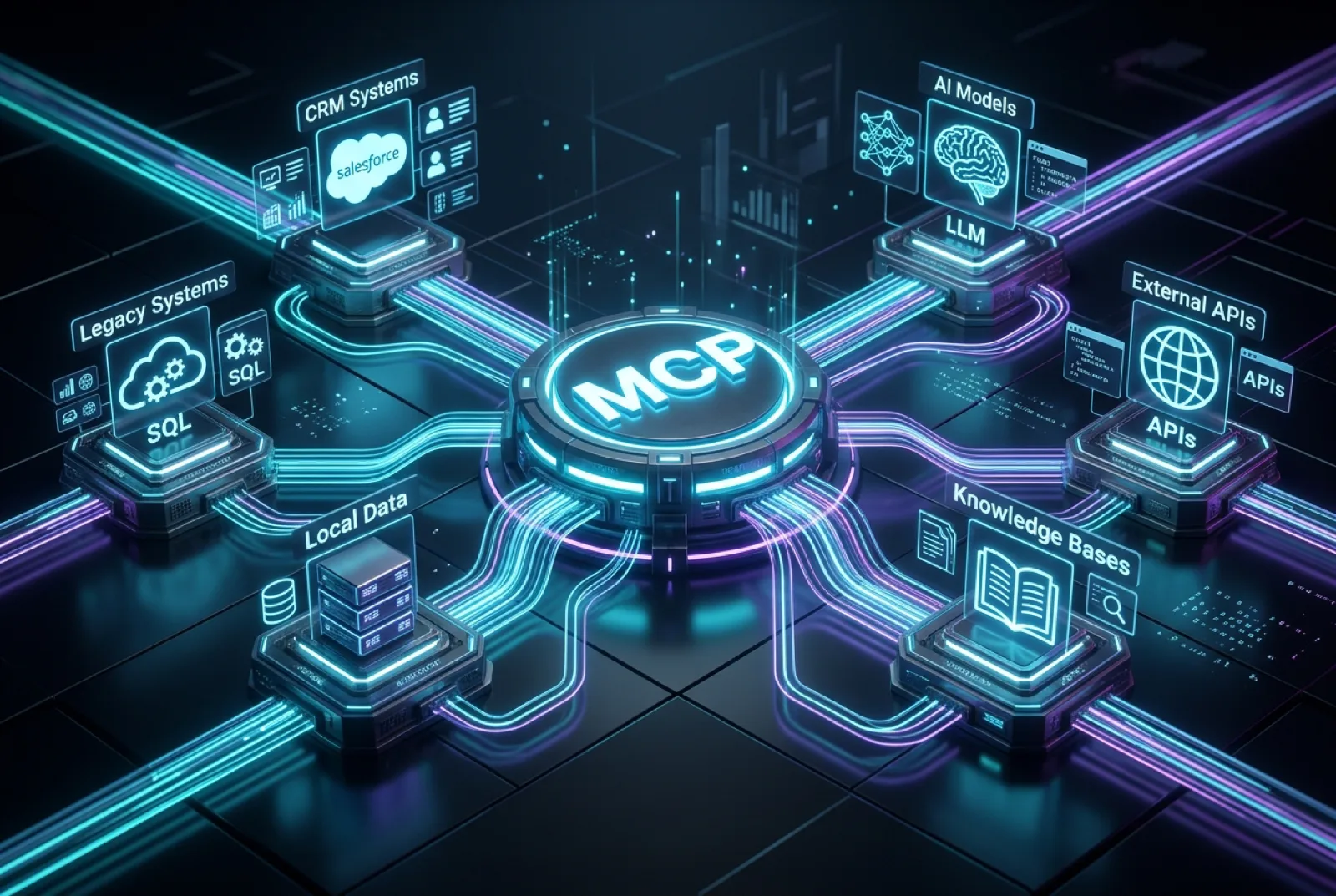
Under the bonnet there are three simple pieces. There is the MCP Host, which is the application you actually use, like your AI assistant. There is the MCP Client, the AI model doing the thinking. And there is the MCP Server, which sits in front of a data source or a tool and makes it available to the AI in a way it understands.
You do not need to remember those names to use MCP any more than you need to understand USB-C to charge your phone. But they are worth naming, because that host, client and server structure is the whole reason one setup can connect to many tools at once.
Why should you care? Because until now, an AI assistant could talk about your business all day but could not touch it. MCP is what changes that. It is the difference between an assistant that gives you advice and an agent that actually gets things done in your real systems.
MCP vs a traditional API: what is the difference?
This is the question business owners ask most, so let's answer it directly.
An API, or application programming interface, is a bespoke connection between two specific systems. You want your AI tool to talk to your customer database, so a developer writes custom code to join those two things. Want it to reach a second system as well? That is a second custom build. Every connection is its own separate job.
MCP flips that. You build one MCP server for a data source, and any AI tool that speaks MCP can connect to it straight away, no fresh integration code required each time. Build once, connect many.
Think of it as the difference between HTTP, the universal standard that lets any browser open any website, and a private cable you would have to run by hand between every two buildings that wanted to talk. The comparison table below lays it out.
| Factor | Traditional API integration | Model Context Protocol (MCP) |
|---|---|---|
| Setup approach | Custom code for each integration, one connection per tool or data source | One MCP server per data source; any compatible AI tool connects instantly, no separate code per tool |
| Reusability | Not reusable, each integration is bespoke and works only for the tools it was written for | Fully reusable, one server works with every compatible AI tool, now and later |
| Maintenance | High, every integration is maintained separately and can break when a system updates | Low, update the server once when a system changes and all connected tools benefit |
| AI compatibility | Limited, a custom build for one AI tool does not work with another without rebuilding | Universal, any tool that supports MCP can connect to any server; switch tools without rebuilding |
| Cost over time | Grows with every new integration, each new tool or source needs more custom development | Falls with scale, adding a new tool to an existing setup costs a fraction of a fresh build |
| Best for | Simple links between two systems unlikely to change | Businesses using multiple AI tools, scaling AI, or building agentic workflows across systems |
The takeaway is not that APIs are bad. They are excellent for a simple, fixed connection between two systems. But the moment you want several AI tools reaching several parts of your business, and you want that to keep working as things change, the universal approach wins on effort, cost, and future flexibility.
How MCP lets AI tools connect to your business systems
So what does one of these connections actually plug into? In practice, an MCP setup can let your AI tools reach the systems you already run every day.
That includes your customer records, your internal databases, your file storage, your calendars and scheduling, your project boards, your online store, and your finance systems. Rather than a person copying information out of one system and pasting it into an AI chat, the AI reaches the live data itself.
That last point is the whole game. It is the shift from an AI that can have a conversation about your data to one that can query it, update it, and act on it. Which brings us to agents.
How MCP powers AI agents that actually do the work
You have likely heard the term agentic AI. An AI agent is a step beyond a chatbot: instead of just answering, it can reason through a task, make a decision, and take action across several systems on its own.
Agents are only as capable as what they can reach, though. An agent with no connection to your systems is a very smart intern with their hands tied behind their back. MCP is what unties them.
With MCP in place, an agent can pull a customer's history from one system, check availability in another, book something in a third, and log the whole thing back in the first, all in one flow, without a human shuttling data between screens. This is why MCP is described as the foundational layer of business AI in 2026. Agents are the visible part; MCP is the plumbing that makes them useful.
What can your business actually do with MCP? Real examples
Enough theory. Here is what this looks like across six everyday business functions, with the plain contrast between how it works without MCP and with it.
| Business function | Without MCP | With MCP |
|---|---|---|
| Customer relationships | The AI can discuss customer data but cannot reach it; someone pulls the information and pastes it in by hand | An agent reads and updates your customer records in real time, prepares briefings, logs interactions, and flags what needs following up on its own |
| Document management | The AI cannot read or write your documents; people copy content back and forth between storage and the AI | An agent searches, reads, summarises, drafts, and saves documents straight to your file system, across teams, in real time |
| Scheduling and operations | The AI suggests meeting times but cannot book; staff manually book, confirm, and update calendars | An agent checks availability, books meetings, sends confirmations, and reschedules clashes automatically across the team |
| Business intelligence | The AI answers general questions but cannot see live data; reports are prepared by hand then fed in | An agent queries live databases, builds real time reports, spots trends, and surfaces anomalies with no manual export |
| Project management | The AI cannot see project status; managers check the tools then describe it to the AI | An agent reads project boards, spots blockers, assigns tasks, updates statuses, and writes progress summaries automatically |
| Sales and orders | The AI cannot reach the product catalogue or orders; the team looks up stock, pricing, and status by hand | An agent reads live inventory, builds quotes, checks order status, and handles enquiries with real product data |
If two or more of those rows describe a daily frustration in your business, that is your signal that MCP is worth a proper look. The value stops being abstract the moment you recognise your own workflow in the table.
Is MCP only for large enterprises, or can small businesses use it too?
Small businesses, this one is for you, because the assumption that this is big company technology is exactly backwards.
MCP is an open standard, so a business of any size can use it. And smaller operators arguably benefit the most. The old way, paying for a custom integration for every tool, was precisely what priced small businesses out of serious automation. One MCP setup connecting your existing systems replaces a pile of those bespoke builds.
Across Australia in 2026, small and medium businesses are picking this up quickly, and the ones doing it are quietly getting automation of a standard once reserved for big companies, on a far smaller budget. The playing field is leveling, and early movers are the ones benefiting.
How Australian businesses can implement MCP
If this all sounds useful and you are wondering where to start, the path is genuinely straightforward. It comes down to three steps.
First, work out which of your business systems your AI tools actually need to reach. Your customer records? Your file storage? Your scheduling? Start with the ones tied to your biggest daily time drains.
Second, build or deploy an MCP server for each of those data sources. This is the technical step, and for most businesses it is the one that needs a development partner, because a server has to be built and secured properly against your specific systems.
Third, connect your AI tools as clients, and you are away. From there, adding another tool later is simple, because the servers you have already built are reusable.
For most Australian businesses, the middle step is where a specialist earns their keep. Getting the servers right, and secure, is what turns the idea into something you can trust with live business data.
Which AI tools support MCP in 2026?
MCP has moved fast from a promising idea to something close to the default way AI connects to the wider world. Through 2025 and into 2026, the major AI development environments, agent platforms, and enterprise AI tools have adopted or announced support for it.
The practical upshot is what matters: because it is a shared standard, any compatible tool can connect to any MCP server. That means you are not locking yourself to one vendor. If you switch AI tools down the track, your connections come with you. The ecosystem is still growing week to week, which is exactly why setting up on the standard now is the sensible move.
Where Synivo fits
We will be upfront about who is writing this. Synivo is an established custom software development and AI engineering company founded in 2018, based in Brisbane with global delivery capabilities, and building these enterprise connections for Australian businesses is squarely what our team does.
That matters for a topic like this, because the middle step above, building and securing the servers, is the part that turns MCP from an interesting concept into a working part of your business. It is practical development work, and it is exactly our lane.
There is also a genuine early mover window here. Very few Australian businesses have set this up yet, which means the ones that do are getting a real head start on automation their competitors have not touched.
If you read the use case table and recognised two or more of your own daily headaches, that is the moment worth acting on. Have a look at what we do at synivo.tech, or book a free discovery call and we will give you a straight read on where MCP could actually help.
Questions business owners ask us
What is Model Context Protocol (MCP) and how does it work?
MCP is an open standard that lets AI models connect to outside tools and data through one universal method, rather than custom code for each link. It has three parts: the MCP Host, which is the app you use, the MCP Client, the AI model, and the MCP Server, which exposes a tool to the AI.
How is MCP different from a traditional API?
An API is a bespoke connection between two specific systems, so you need one build per integration. MCP is a universal standard: build one MCP server and any compatible AI tool can connect to it instantly. Think of the universal web standard that lets any browser open any site, versus a private cable run by hand between two buildings.
What can businesses do with Model Context Protocol?
MCP lets AI tools connect to customer records, internal databases, file storage, calendars, project management tools, online stores, and finance systems. Once connected, an AI agent can query, update, and act on real business data, rather than only having a conversation about it. That is the shift from an assistant that advises to one that does the work.
Is MCP only for large enterprises, or can small businesses use it too?
Any business of any size can use it, because MCP is an open standard. Small businesses often benefit most: instead of paying for an expensive custom integration per tool, one MCP setup connects all their AI tools to their existing systems. Across Australia, small and medium businesses are adopting it quickly through 2026.
Which AI tools support Model Context Protocol in 2026?
MCP is fast becoming the default way AI connects to other systems in 2026. The major AI development environments, agent platforms, and enterprise AI tools have adopted or announced support for it. Because it is a shared standard, any compatible tool can connect to any MCP server, so you are not locked to a single vendor.
How do I implement MCP in my business?
Three steps: identify which systems your AI tools need to reach, build or deploy an MCP server for each data source, then connect your AI tools as clients. For most businesses the middle step needs a development partner, since servers must be built and secured against your systems. Synivo builds custom MCP setups for Australian businesses.